Giacomo Rossi / Programmer and AI consultant

02 Control and supervision

Making a complex system clear.

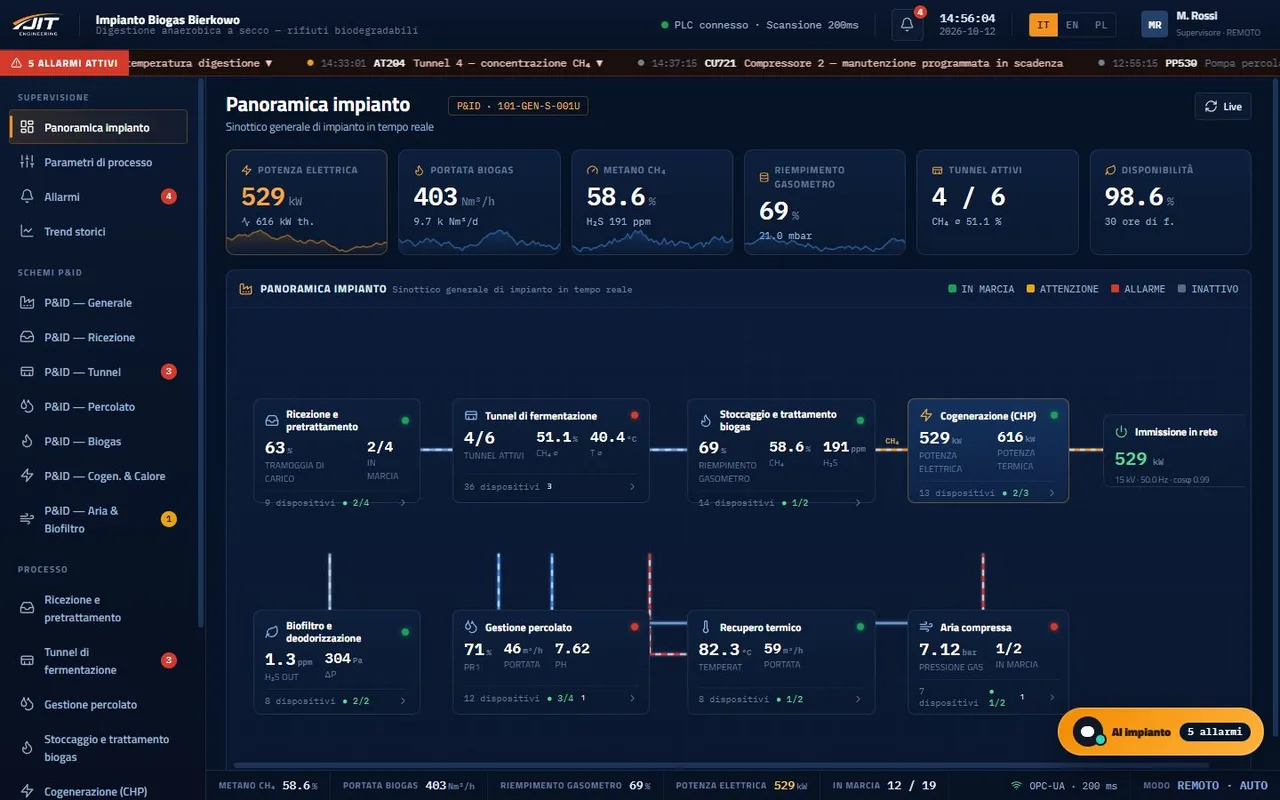
I connect variables, sequences and alarms in an interface people can understand. Explore this work with Operion.

Inside Operion
OPERIONSCADA / 01
Preview of the simulated monitoring demo for the Bierkowo biogas plant
Operion · Simulated supervision demo

03 AI consulting for businesses

A request. A next step.

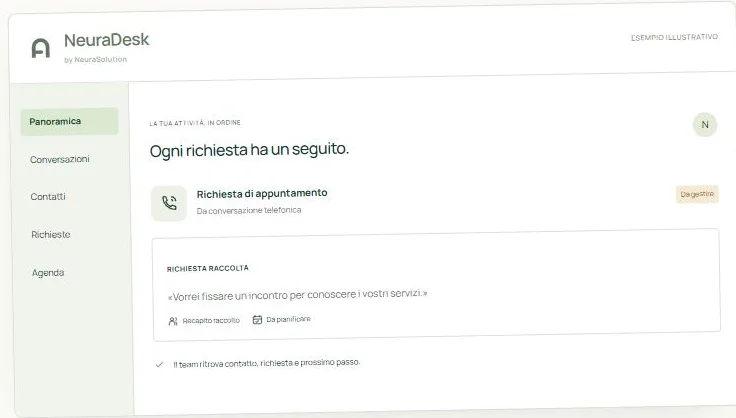
I start with the process. With NeuraDesk, a request becomes a task for the team to follow up, with people in control.

Inside NeuraDesk
NEURADESKAI / 02
Illustrative NeuraDesk example: an enquiry received by phone is organised for the team
NeuraDesk · Illustrative workflow

04 Giacomo Rossi

What problem shall we start with?

A plant to integrate, software to build, a process to rethink. Tell me what you would like to solve.

Let’s discuss your project
Giacomo Rossi.
Giacomo Rossi by the waterfront at sunset
Giacomo Rossi / Programmer and AI consultant
Giacomo Rossi sitting at an outdoor café table with a coffee
Giacomo Rossi · Original photograph

Scroll: from signal to solution

Illustrative industrial sequence generated with AI

Where do we start?

Two ways to work together.

A plant, a software application, a business process. We clarify what you need and choose the right tools.

01

Automation and integration

For machine builders and plant operators who need control, supervision and software to work together.

  • PLC, HMI and SCADA programming
  • Drives, revamping and commissioning
  • Integration of plants, interfaces and data
02

AI consulting for businesses

For businesses looking to understand where AI can help in everyday work and how to bring it into their processes.

  • Analysis of processes and repetitive tasks
  • Prototypes for documents, enquiries and workflows
  • Integration with existing tools and human review

From a problem to a solution

A signal. A decision. An action.

This is where software meets the physical world. Change the tank level and follow what happens next.

Interactive simulationEducational example · No equipment connected
42%70% threshold

Move the slider. The activation threshold is 70%.

Allows the PLC to start the pump when the level is high.

  1. 01

    Sensor

    Measures the level and turns it into a signal.

    42%
  2. 02

    PLC logic

    Checks the signal against the threshold and the control permission.

    Level ≥ 70%FalseControl enabled
  3. 03

    SCADA supervision

    Makes the process status visible.

    Normal level
  4. 04

    Action

    Controls the drainage pump.

    Pump stopped

The level is below the threshold: the PLC keeps the pump off and SCADA shows a normal status.

My job is to make this chain clear, reliable and useful to the people who use it.

01 / A little about me
Giacomo Rossi walking through the streets of a small town
Ideas can come while taking a walk, too.

Where I start

Technology is the means.
People give it meaning.

I’m interested in that moment when a problem becomes clear and a solution starts to take shape.

My work began in industrial automation: PLCs, SCADA, drives and systems that need to work together. It taught me to think precisely and test my ideas against reality.

I founded JIT Engineering, where I lead project architecture and technical direction. Through NeuraSolutions, its software and AI brand, I bring that work into new settings. As an AI consultant, I help businesses understand where and how to use it in their processes.

The tools change, but the thread stays the same: understand a need and build something that is truly useful.

How I work

02 / What I do

From machines
to new possibilities.

Three fields that come together in my work.
One way of approaching problems.

01

Industrial automation

This is where I started. I program control systems and work on the connections between machines, plants and people.

  • PLC
  • SCADA
  • Drives
02

Software and integration

I connect components and information. I build software and interfaces that make systems easier to understand and use.

  • Software
  • Interfaces
  • Systems
03

AI consulting for businesses

I work with businesses to understand their processes, identify useful applications of AI and integrate it into everyday work.

  • Processes
  • Applied AI
  • Integration

03 / My workshop

The work continues
in the workshop.

This is where I collect engineering tools and other software and AI applications. Each project has its own scope and development stage, stated on its card.

01 / The company · Automation and integration

JIT Engineering

JIT Engineering is the company I founded to work on PLCs, HMIs, SCADA, revamping and commissioning. It is the foundation of my industrial work and the engineering tools I develop.

Visit JIT Engineering (opens in a new tab)

02 / The brand · Software and applied AI

NeuraSolutions

NeuraSolutions is the JIT Engineering brand dedicated to software and applied AI. NeuraDesk, RISTIQ and the other products are applications of this work, each following its own development path.

Visit NeuraSolutions (opens in a new tab)

Explore the workshop

Three starting points across automation and AI. Filter by area or open the full collection: previews and work in development are labelled accordingly.

03 of 14 projects
01 / PLC / HMI engineeringWindows software

JIT Engineering

Sapius

AI within an automation project: from technical documents to writing and checking PLC code.

  • TIA Portal
  • SCL
  • Project documents
Inside the project Sapius

With Sapius, I bring manuals, signal lists, source code and project decisions into one environment. I want to ease the repetitive parts of engineering while keeping the engineer in charge of verification.

How it takes shape

  • For TIA Portal V16–V20, it uses Openness to prepare SCL blocks, DBs and UDTs, import them into a copy of the project, compile and address the errors found.
  • It consults the project’s PDFs, Word documents and Excel sheets, keeping files, references and decisions in the same context.
  • It provides workflows for other PLC and HMI environments, including Rockwell, CODESYS and TwinCAT, depending on the manufacturer’s tools available on the PC.

The manufacturers’ software and licences are still required. Testing and downloading to the PLC remain the engineer’s responsibility; Sapius Local is presented separately as a preview.

Explore Sapius: Sapius (new tab)
02 / SCADA designStudio · private pilot

JIT Engineering

Operion

A workflow from process graphics to runtime on the plant PC, with tags, alarms and revisions.

  • SCADA
  • Process graphics
  • Local runtime
Inside the project Operion

With Operion, I work on the connection between what is designed and what an operator uses on the shop floor. Documentation, interfaces and process variables need to stay consistent as the project changes.

The development path

  • Studio brings together specifications, diagrams and images. It supports work on HTML/CSS graphics, tag associations and revisions, with imports from compatible projects.
  • The runtime presented in the Sapius ecosystem handles process graphics, commands, alarms and trends through S7, Modbus TCP, OPC UA and EtherNet/IP connections.
  • Running on the plant PC keeps the connection to the process local; activating changes requires the operator’s confirmation.

Studio is limited to the private pilot. Generative and voice features are described as not yet active; the runtime is a separate component.

Discover Operion Studio: Operion (new tab)
05 / AI receptionistDemo on request

NeuraSolutions

NeuraDesk

An AI receptionist that takes incoming calls and turns a conversation into a request to follow up.

  • Telephony
  • Requests
  • AI Reception
Inside the project NeuraDesk

With NeuraDesk, I bring AI to a business’s first point of contact. The aim is to give a useful answer, gather the information needed and give people a clear next step, even when they cannot answer immediately.

How it takes shape

  • It answers incoming calls using the business’s information, such as opening hours and services, and collects contact details and requests.
  • It sends email or Telegram notifications. Advanced plans include history and CRM, calendars, appointments and preparation of requests to hand over to the team.
  • The AI Reception extension brings a voice avatar to countertop or freestanding kiosks and connects requests to the same management system.

Features and integrations depend on the plan and configuration; reception hardware is separate.

Discover NeuraDesk: NeuraDesk (new tab)

04 / How I work

Understand first.
Then, build.

I don’t start with the technology.
I start with the right questions.

  1. 01

    I listen and observe

    I try to understand the context, the people involved and what they really need.

  2. 02

    I find the focus

    I separate the problem from its consequences and choose a practical way forward.

  3. 03

    I build and test

    I turn the idea into a prototype, put it to the test and observe how it behaves.

  4. 04

    I improve in practice

    I use what happens in the real world to refine, simplify and develop the solution.

05 / Let’s stay in touch

Have a problem to solve?
Let’s start a conversation.

A project to build, a collaboration to explore
or simply a good question. I’d be glad to hear from you.

It starts with a good question

Tell me about your idea.

A plant to improve, software to build or advice on using AI in your business. Tell me where you’re starting and what you’d like to achieve: we can begin there.

Prefer email? Write to me directly.

A message, straight to me

Where shall we start?

Write to Giacomo Rossi

20 to 5,000 characters. A few lines are enough to get started.

I use these details to read your enquiry and reply. You won’t be subscribed to a newsletter. Read the privacy notice